


mp3-Arranger
The mp3-Arranger is a tool for managing a big collection of mp3's clearly and efficiently.
The song details, well known from the ID3 tag, like "title", "artist", "album", "genre", "year", and "comments" as well as the track length are presented in a table. In the background, additional information (e.g. disk, path, file name, ...) are stored. The program provides a comfortable import tool which enables you to extract the data of the ID3 tag (if extant), so that you don't have to enter all the data yourself.
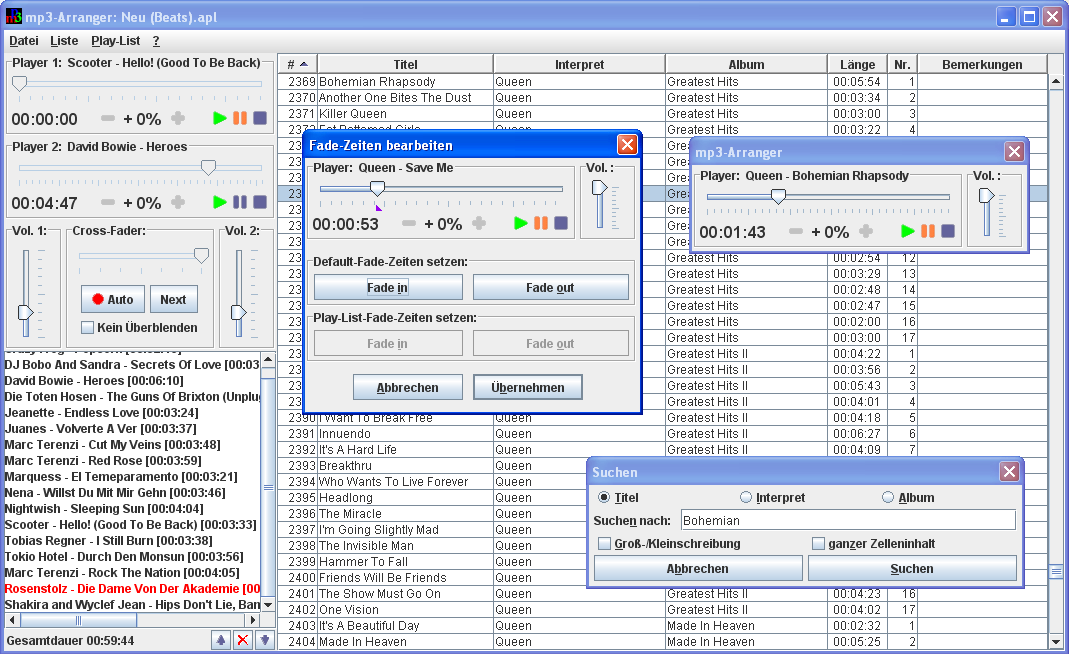
The program running on Windows (click to enlarge)
But that's not all: The highlight is the integrated player, consisting of two playback units, a mixer, and a play list. Beside the features known from conventional CD players, the player provides a crossfader for easy fading over and an automatic mode, in which the player acts on its own. The Play-List has an export feature, which allows you to copy the files of the Play-List to Memory Sticks, for example. The order of the titles (can be changed with the arrow up/down buttons) is kept during export (this is useful especially with portable players which play the songs in the order they were saved on the Memory Stick).
Note: This application has no longer been maintained since 2009. Here you can download the latest version: JAG & the-dom mp3-Arranger 6.2 (Windows Installer). If you don't have installed Oracle's Java Runtime Environment (JRE) so far (or if you have an older version than 1.4), please install first the recent JRE: http://www.oracle.com/technetwork/java/javase/downloads/index.html